See it
From the Null Server CI build, on the text console.
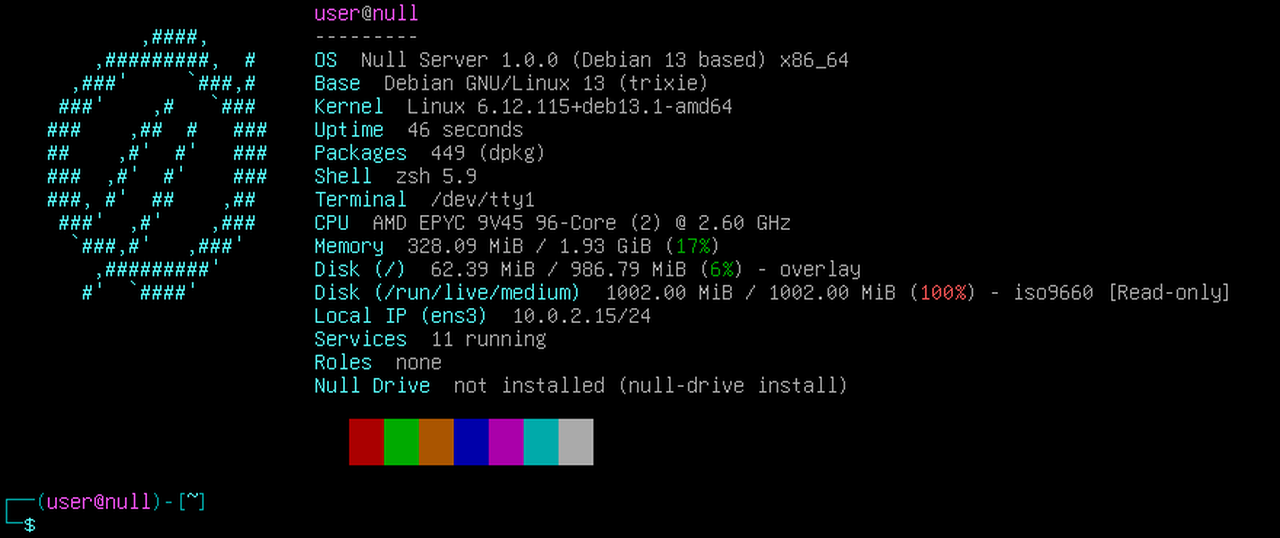
Null OS for servers: Debian 13, no desktop, ready for Null Drive.
Its own release line, separate from Null OS. Live session login: null / null.
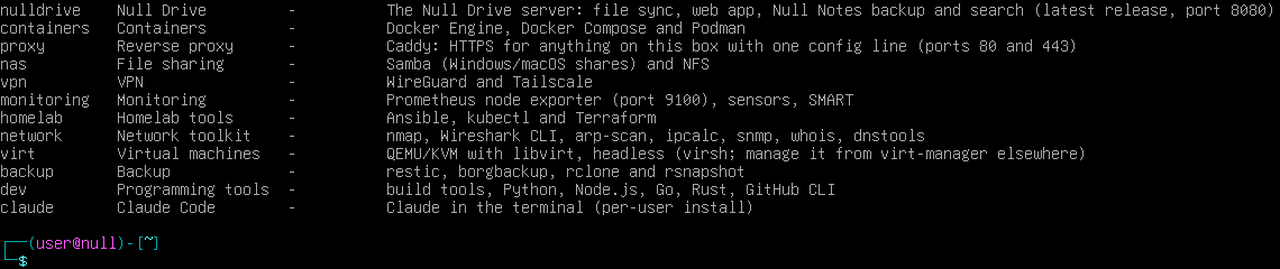
From the Null Server CI build, on the text console.
Debian 13 with no desktop and the Null OS terminal. Boots to a shell from USB, installs to a disk in minutes (or unattended), with SSH, a firewall and security updates on from the start. Roles add Docker, Caddy, Samba/NFS, WireGuard, KVM, backups and more when you ask.
Homelabbers who want a small, ready server: a mini PC, an old laptop, a Proxmox or KVM guest, or a UEFI ARM board.
null-drive install sets up the Null Drive server on port 8080 and prints the address to put in Null Grid's Drive settings.
Two ISOs: x64 for PCs, servers and VMs, ARM64 for UEFI boards. Every download comes straight from the 1.1.0 release.
Live session login: null / null. Then sudo null-install puts it on a disk.
PCs, servers, and Proxmox or KVM guests. Boot it to try it live, then run sudo null-install.
Save it next to the ISO, then check the download.
$ sha256sum -c nullserver-1.1.0-trixie-amd64.iso.sha256UEFI ARM boards and VMs.
Save it next to the ISO, then check the download.
$ sha256sum -c nullserver-1.1.0-trixie-arm64.iso.sha256Writes the ISO and keeps changes on the stick, so it can run as a tiny server by itself. Replace /dev/sdX with your USB stick (check with lsblk).
$ git clone --depth 1 https://github.com/Null0Grid/null-server && \
sudo null-server/tools/make-usb.sh nullserver-1.1.0-trixie-amd64.iso /dev/sdXA plain copy. balenaEtcher or Rufus on Windows also work.
$ sudo dd if=nullserver-1.1.0-trixie-amd64.iso of=/dev/sdX bs=4M status=progress conv=fsyncCheck a file before you run it: sha256sum <file> on Linux and macOS, Get-FileHash <file> in PowerShell.
| nullserver-1.1.0-trixie-amd64.iso | ISO image · x64 | edded7e075069ffeb3d7f846d8e702d80fb5737ca37826a17580f5acabbea921 |
| nullserver-1.1.0-trixie-amd64.iso.sha256 | Checksum file | 11a0c8ef74da91d0b580cd00d5b4ef339011350ad7bba3dea81358877ff13ae0 |
| nullserver-1.1.0-trixie-arm64.iso | ISO image · x64 | a78065a188b0c9f21f2a734fcbcbdc9cd664f675f58067bc63abd234a2ba907f |
| nullserver-1.1.0-trixie-arm64.iso.sha256 | Checksum file | bb32917c123e28c10a0a0158ec35c0246dccadf712011df70bc6c3538a7e3efc |